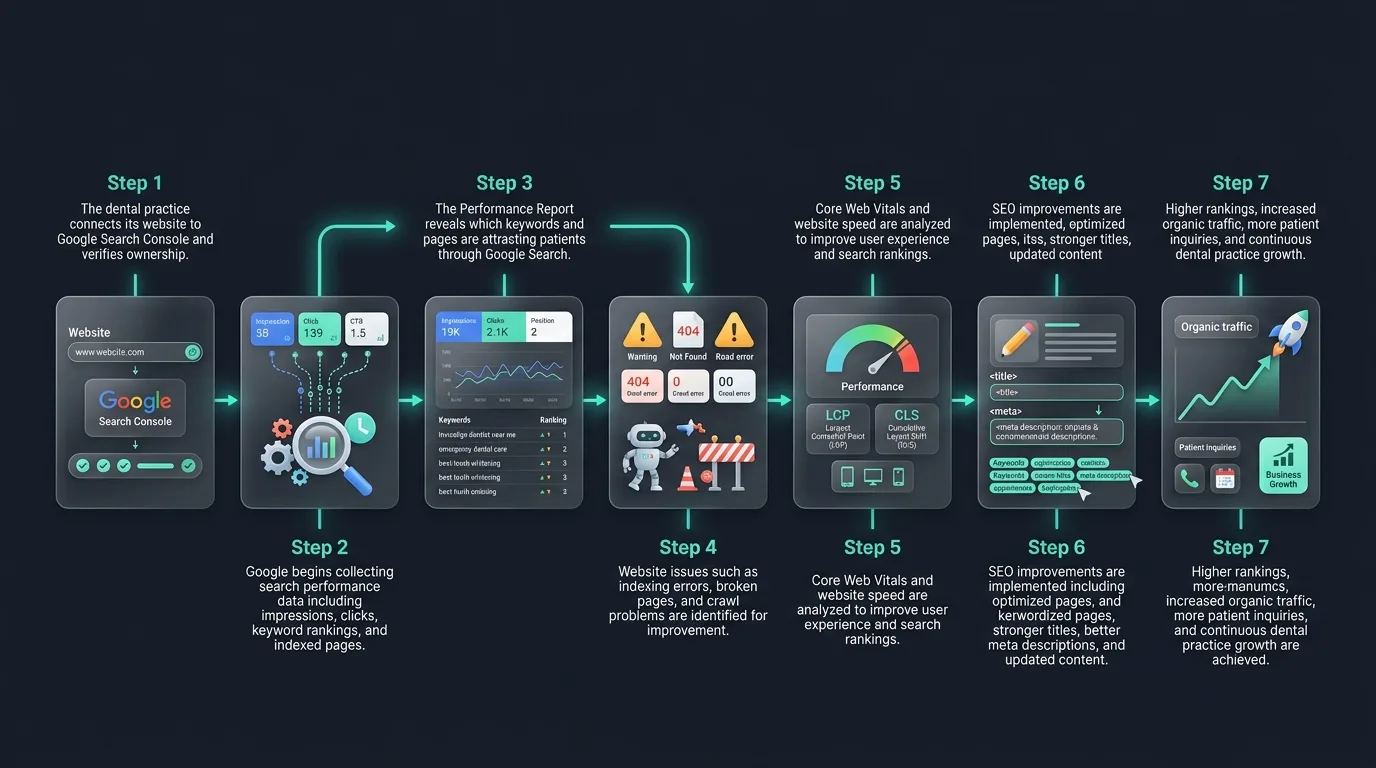
Key Takeaways
Google Search Console is a free tool that every dental practice needs to use. It shows you how your website performs in Google search, which dental SEO keywords bring patients to your site, and where your website has problems that are holding back your rankings. This blog walks you through exactly how to use Google Search Console to support your dental SEO strategy, grow your organic traffic, and attract more new patients every month.
- SERP Indexing: Monitor which clinical service pages are properly crawled and visible.
- Query Diagnostics: Track impressions and click counts for high-value case keywords.
- Errors Management: Review broken redirect loops and sitemap crawl alerts.
- AI Recommender Seeds: Establish on-SERP search trust to push content to AI summaries.
- What Is Google Search Console and Why Do Dentists Need It
- How to Connect Google Search Console to Your Dental Website
- Understanding the Performance Report for Dental SEO
- Using Search Queries to Find Your Best Dental SEO Keywords
- The URL Inspection Tool and Dental Website SEO Health
- Coverage Report: Finding and Fixing Dental Website Errors
- Core Web Vitals and Dental Website Performance
- Sitemaps: Helping Google Find All Your Dental Website Pages
- How Google Search Console Supports Local SEO for Dentists
- Why Traditional SEO Is Not Enough Anymore
- A Monthly Google Search Console Routine for Dental Practices
- Final Thoughts
- Frequently Asked Questions
What Is Google Search Console and Why Do Dentists Need It
Google Search Console is a free tool made by Google. It shows you how your dental website appears in Google search results. It tells you which pages are ranking, which dental SEO keywords are driving clicks, how many people see your site in search, and whether Google can read your pages correctly.
For dentists, this tool is essential. Without it, you are running your dental SEO marketing blind. You do not know what is working, what is broken, or where your biggest opportunities are. Every dental SEO expert, dental SEO specialist, and dental SEO consultant uses Google Search Console as a core part of their work. Learn about performance indicators in our local SEO KPIs guide.
The best part is that it costs nothing. Any dental practice, from a startup dental practice to a multi-location dental group, can connect Google Search Console to their website today and start getting real data. Review general setup options in our main tracking results guide.
How to Connect Google Search Console to Your Dental Website
Setting up Google Search Console takes about ten minutes. Go to search.google.com/search-console and sign in with a Google account. Add your dental website as a property. Google will ask you to verify that you own the site.
The easiest way to verify is through Google Analytics if you already have that set up. Your dental SEO agency or dental SEO company can also handle this setup for you if you are working with a professional team. Learn details in our call tracking guide.
Once verified, Google Search Console will start collecting data about your dental website SEO performance. Within a few days you will begin to see search queries, impressions, clicks, and page rankings.
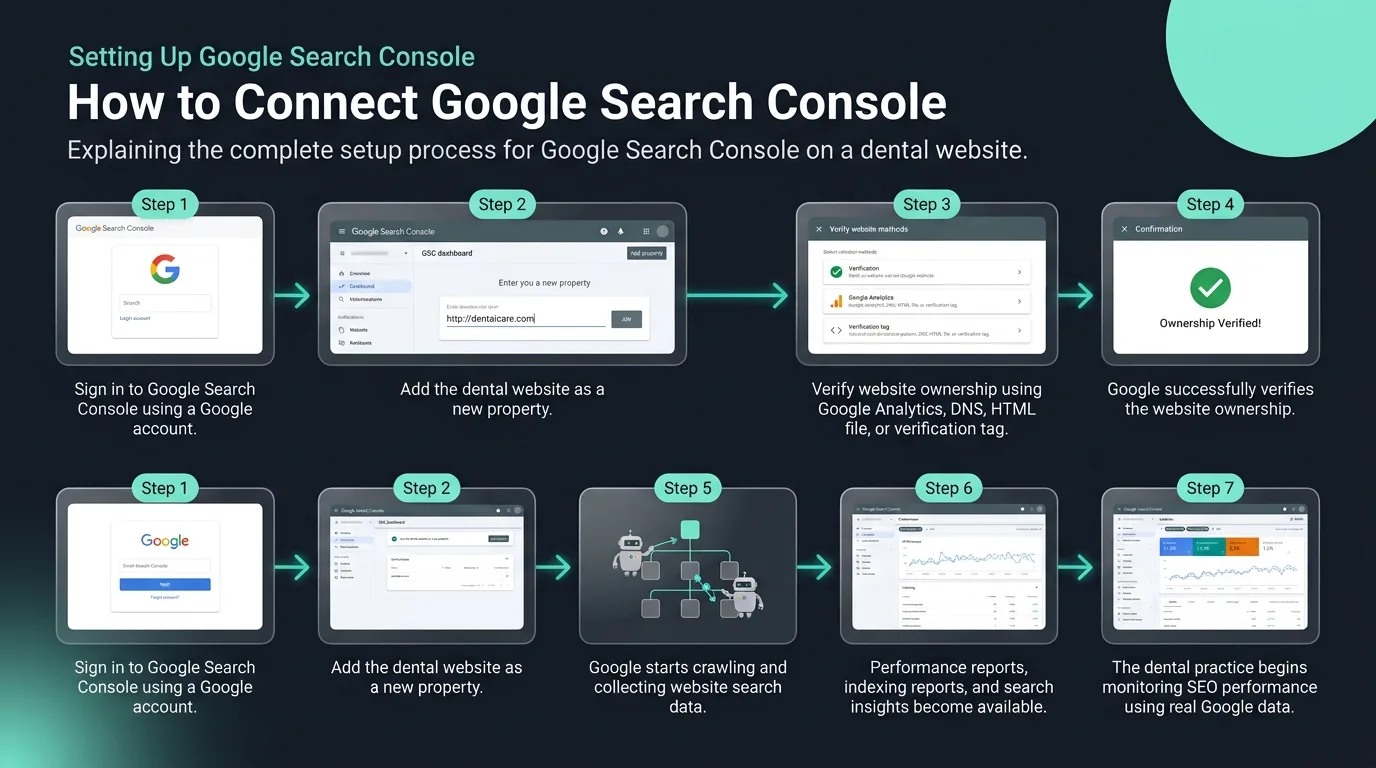 Figure 1: Verifying dental website ownership using Google Analytics property tags.
 Understanding the Performance Report for Dental SEO
The Performance report is the most important section of Google Search Console for dental practices. It shows you four key numbers.
- Total Clicks: This is how many times someone clicked on your dental website in Google search results. This is direct organic traffic from search.
- Total Impressions: This is how many times your website appeared in search results, even if nobody clicked. A high impression count with a low click count means your page is showing up but not attracting patients. Your dental website SEO and meta descriptions may need improvement.
- Average Click Through Rate (CTR): The percentage of impressions that turned into clicks. For dental SEO, improving this rate means more patients reach your website without spending more on ads.
- Average Position: Where your website ranks on average for the keywords that show your pages. A position of 1 to 3 means you are near the top. A position above 20 means patients rarely see you.
Your dental SEO marketing company should review these four numbers with you every single month. Together they tell the story of how your dental search engine optimization is performing.
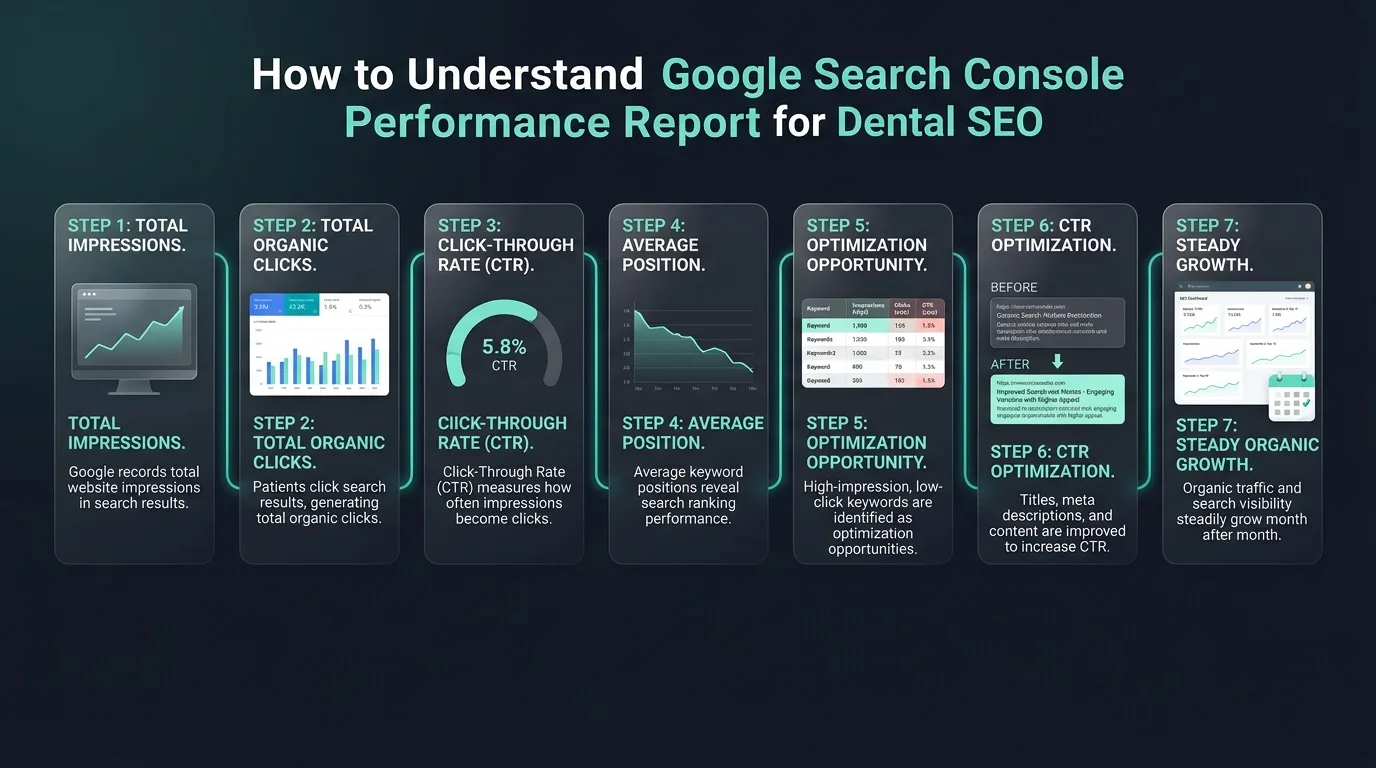 Figure 2: Core search console performance indicators tracking organic clinic impressions.
 Using Search Queries to Find Your Best Dental SEO Keywords
Inside the Performance report, you can click on the Queries tab to see the exact search terms patients use to find your dental website. This is one of the most valuable features in all of dental SEO marketing.
You will see which dental SEO keywords are already bringing you impressions and clicks. You may find that terms like "dental implants in your city" or "emergency dentist near me" are driving real traffic. You may also find high-impression keywords where your click through rate is very low. These are opportunities. Review clinical implants pages in our implants page guide.
When a keyword gets many impressions but few clicks, it means your page is ranking but not compelling enough for patients to choose you over a competitor. Your dental SEO specialist can improve the page title and meta description to make it more appealing and increase clicks.
You will also find keywords you did not even know you were ranking for. These hidden opportunities help your dental SEO agency build a smarter content strategy around what is already working. Learn keywords list options in our dental keywords guide.
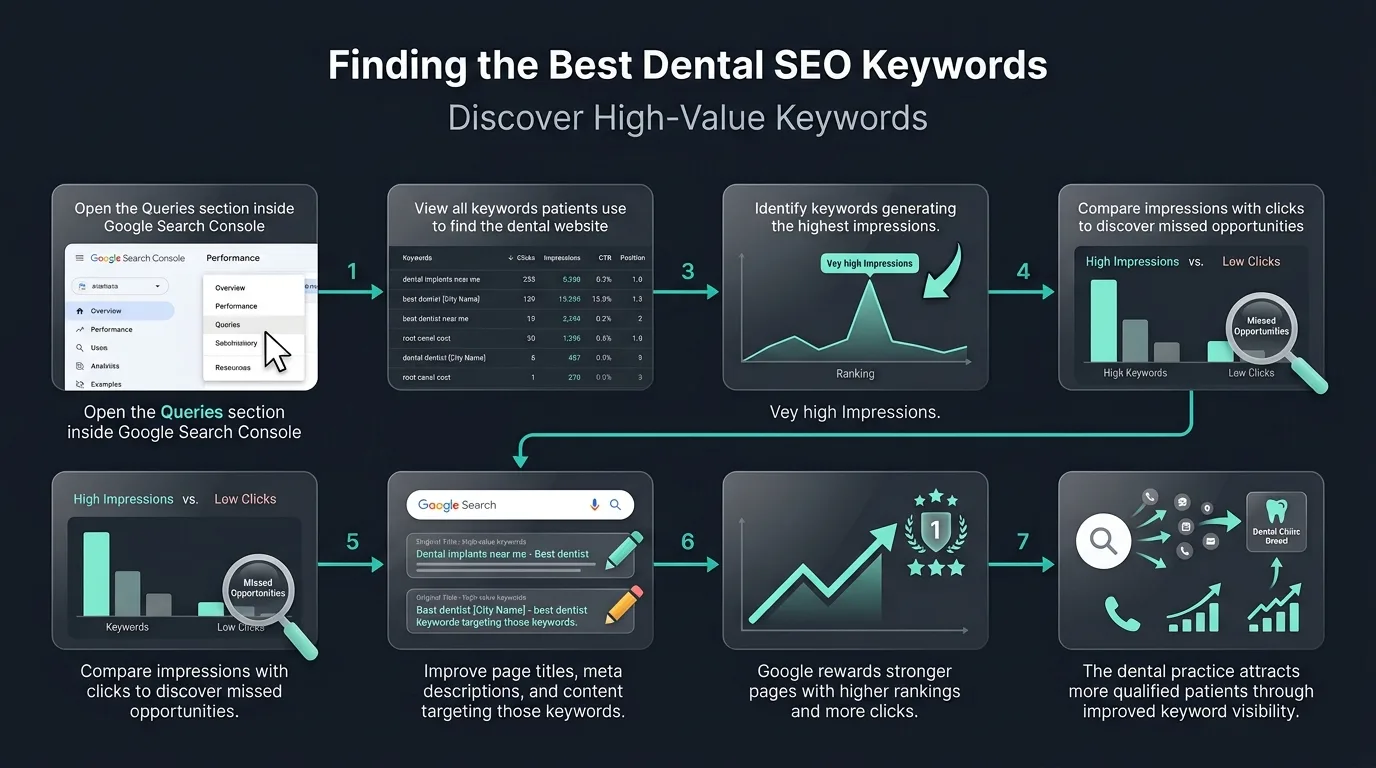 Figure 3: Inspecting queries reveals specific clinical search intents.
 The URL Inspection Tool and Dental Website SEO Health
The URL Inspection tool lets you check any individual page on your dental website. Type in a page URL and Google Search Console will tell you whether Google has found and indexed that page, when it was last crawled, and whether there are any problems.
For dental website optimization, this tool is critical. If Google has not indexed your dental implants page or your cosmetic dentistry services page, those pages cannot rank in search. They are invisible to patients. Review cosmetic pages in our cosmetic dentistry guide.
Your dental SEO company should regularly check your most important pages using this tool to make sure they are indexed, mobile-friendly, and free of errors. If a page has issues, you can request that Google recrawl it after making fixes.
Coverage Report: Finding and Fixing Dental Website Errors
The Coverage report shows you every page on your dental website organized by status. Pages can be valid, have errors, have warnings, or be excluded from Google's index.
Errors are the most urgent. If your services pages, your about page, or your appointment booking page has an error, Google cannot show it in search results. That means patients searching for dental implants, teeth whitening, or emergency dental care will never find those pages no matter how good the rest of your dental SEO strategy is.
Common errors include broken links, pages blocked by your website settings, duplicate content issues, and redirect problems. A dental SEO expert who monitors your coverage report regularly catches and fixes these issues before they hurt your search rankings and your new patient flow.
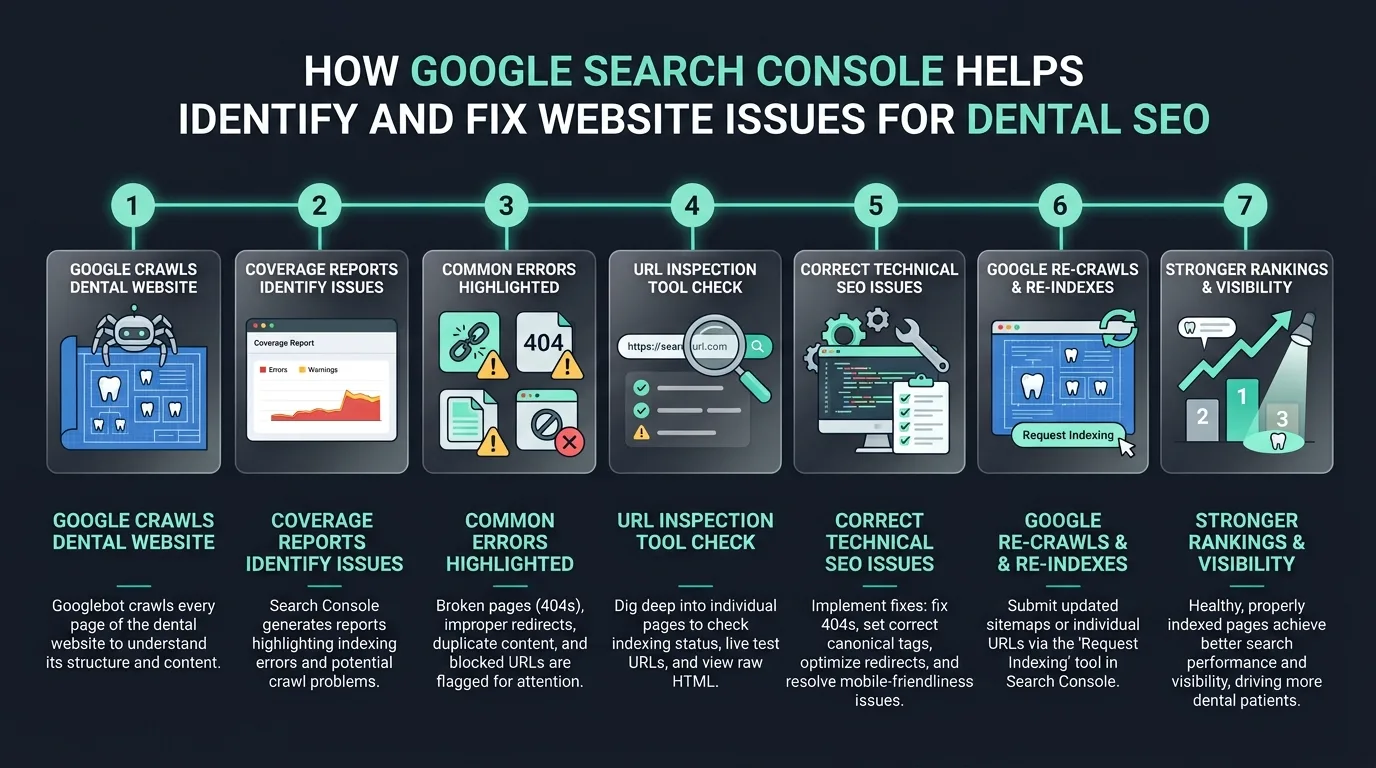 Figure 4: Tracking coverage errors catches broken redirects and indexing blocks.
 Core Web Vitals and Dental Website Performance
Google Search Console also shows you your Core Web Vitals scores. These measure how fast your dental website loads, how stable it is while loading, and how quickly it responds to a patient clicking a button.
Google uses Core Web Vitals as a ranking factor. A slow dental website will rank lower than a fast one even if the content is better. For dental website SEO, this means your website hosting, your image sizes, your code, and your design all affect your rankings. Review speed metrics in our mobile SEO guide.
If your Core Web Vitals scores are poor, your dental SEO agency should work with your web team to fix them. Faster websites also keep patients engaged longer, which improves your conversion rate and brings in more new patient appointments. Review code frameworks in our technical SEO guide.
Sitemaps: Helping Google Find All Your Dental Website Pages
A sitemap is a file that lists all the pages on your dental website. Submitting your sitemap through Google Search Console tells Google exactly which pages exist and helps it crawl your site more efficiently.
For dental practices with large websites, multiple service pages, blog content, and location pages, a sitemap is essential. Your dental SEO marketing company should submit and maintain your sitemap to make sure every new page you add gets found and indexed by Google as quickly as possible. Review directory structures in our schema implementation guide.
How Google Search Console Supports Local SEO for Dentists
Google Search Console and local SEO for dentists work together. The search query data shows you which local terms patients are using to find your practice. You can see whether you are ranking for terms like "dentist in your neighborhood," "pediatric dentist near your city," or "orthodontist in your area."
This data helps your dental local SEO marketing strategy stay focused on what actually matters in your market. Your dental SEO strategies can be built around the real searches happening in your community rather than generic assumptions. Review listings directories in our citations guide.
When you combine Google Search Console data with your Google Business Profile insights, you get a complete picture of how patients find you locally, both through organic website search and through Google Maps. Review listings NAP settings in our NAP consistency guide.
Why Traditional SEO Is Not Enough Anymore
Here is something every dentist and dental practice owner needs to understand clearly. Traditional dental search engine optimization is no longer enough on its own to keep growing your practice.
Patients are now searching for dentists using AI tools like ChatGPT, Perplexity AI, Google Gemini, Microsoft Copilot, and SearchGPT. These tools do not show a ranked list of dental websites. They give one direct answer. If your practice is not structured to appear in that answer, you are missing a growing number of potential new patients. Review strategy setups in our zero-click search guide.
This is why every dental SEO strategy today must include Generative Engine Optimization (GEO) and Answer Engine Optimization (AEO) alongside traditional search engine optimization for dentists. Learn recommendations in our ChatGPT recommendations guide.
Generative Engine Optimization (GEO): GEO means your website content and data are structured so that AI engines trust your practice as a verified source. A dental SEO agency that understands GEO uses schema markup, consistent business data, and authoritative content to get your practice recommended by name in ChatGPT, cited in Perplexity AI answers, featured in Google AI Overviews, and mentioned by Microsoft Copilot. Review schema markup details in our schema guide.
Answer Engine Optimization (AEO): AEO means creating content that directly answers the questions patients ask AI tools. When a patient asks an AI tool "what is the best dental implant practice near me" or "how do I find a dentist that accepts my insurance," your practice needs to be the source those tools rely on. Learn AI setups in our guide on Generative Engine Optimization for dentists.
Google Search Console plays a role here too. Pages that rank well in traditional Google search are more likely to be picked up by Google Gemini and Google AI Overviews. Strong impressions and high click through rates signal to Google that your content is trusted and relevant, which makes it more likely to be featured in AI-generated answers. Review Google AI Overviews in our Google AI Overviews guide.
The dental practices that combine strong Google Search Console monitoring with GEO and AEO strategies are the ones that will dominate both traditional and AI-driven search for years to come.
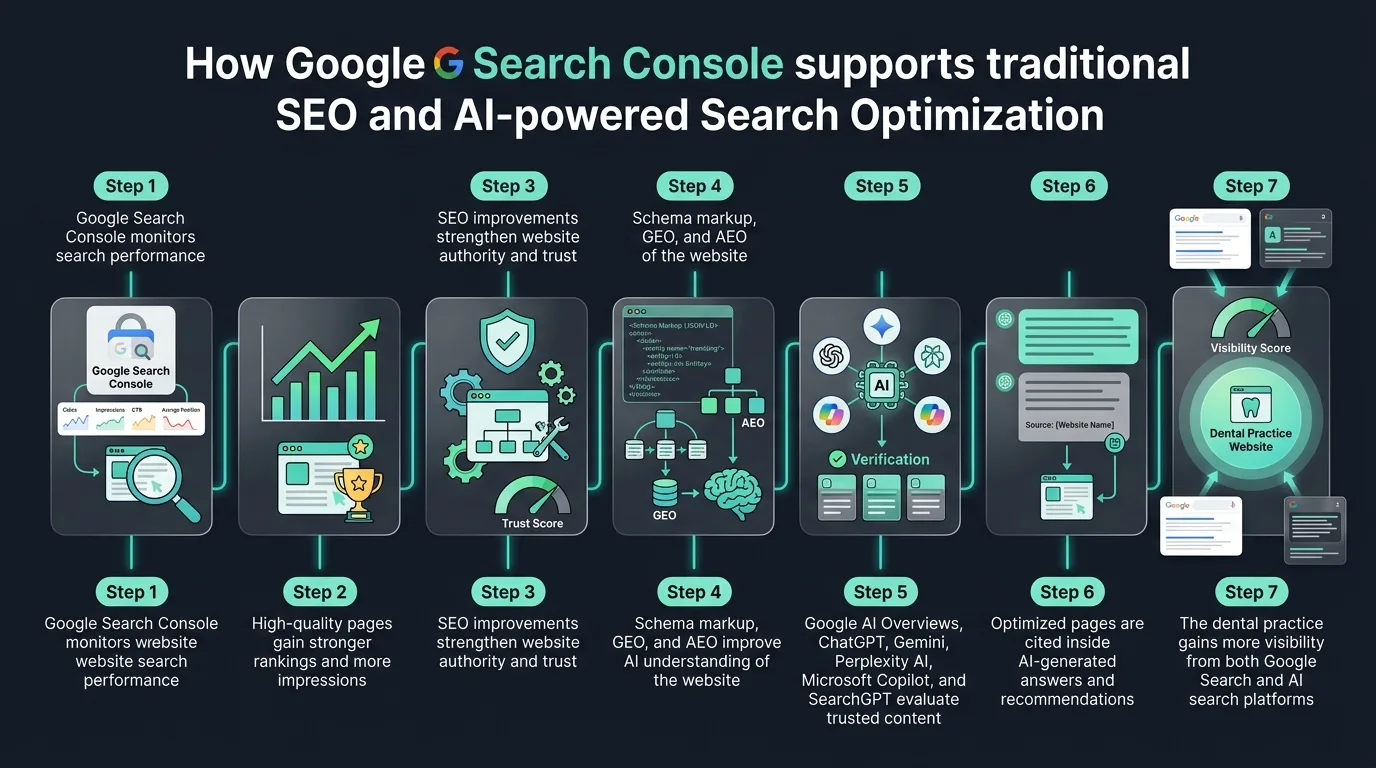 Figure 5: Google Search Console signals feed indexing databases, pushing pages into AI recommender summaries.
 A Monthly Google Search Console Routine for Dental Practices
Establishing a structured diagnostic routine is key to catching errors before they decrease your lead volume.
- Performance Comparison: Check your Performance report and compare clicks, impressions, and average position to last month. Look for keywords gaining traction and keywords that are dropping. Review link backlinks profiles in our local link building guide.
- Error Clearance: Review your Coverage report for any new errors and fix them immediately.
- Speed Assessment: Check your Core Web Vitals for any performance issues. Review speed audits in our Core Web Vitals guide.
- URL Inspection: Inspect your most important pages using the URL Inspection tool. Review FAQ schema markup in our FAQ schema guide.
- Agency Reporting Sync: Share all of this data with your dental SEO marketing service or dental SEO agency so they can act on it. Review checklist steps in our dental local SEO checklist.
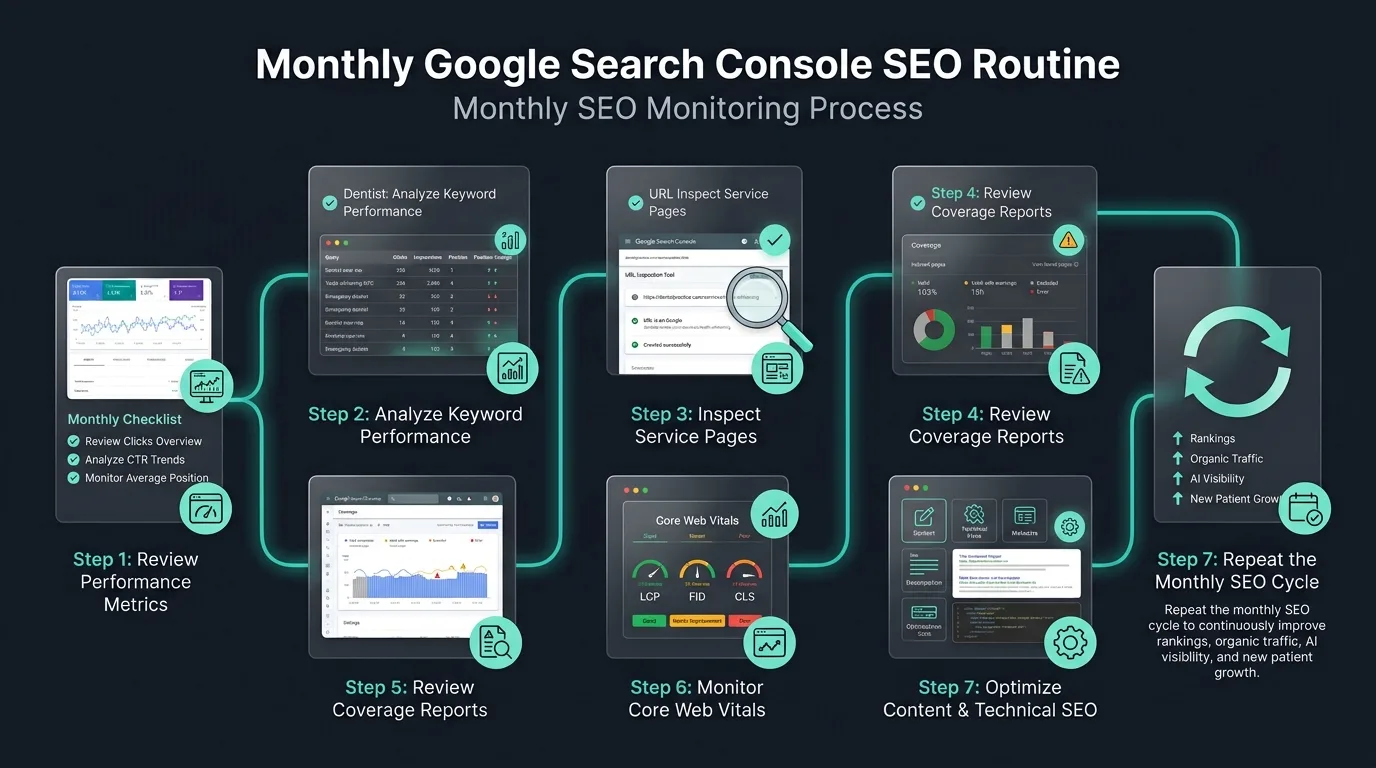 Figure 6: A checklist routine keeps indexing status active and error counts cleared.
 This routine takes less than an hour each month but it gives your dental SEO marketing company the information they need to keep improving your results.

Ready to Dominate Local & AI Search?
Navigating the complexity of Local Map Packs, traditional search rankings, and emerging AI engine visibility can be difficult. Schedule a practice growth audit with our dental SEO specialists today. We will analyze your practice listings, audit your competitor strategies, and layout the exact plan needed to capture high-value cases.
Schedule Growth AssessmentFrequently Asked Questions
It is a free tool provided by Google that shows how search engine crawlers view your website, tracks keyword clicks, and identifies coding error alerts.
Log in with your Google Account, verify your site ownership via HTML tag, DNS record, or Google Analytics link options.
A feature that reports page indexing status, showing crawl timestamps and mobile layout errors for any service page.
Page load speed and stability scores directly act as SEO ranking factors, helping fast-loading sites outrank sluggish ones.
Sitemaps list all clinical service and location pages, guiding Google bots to discover and index new dental content quickly.